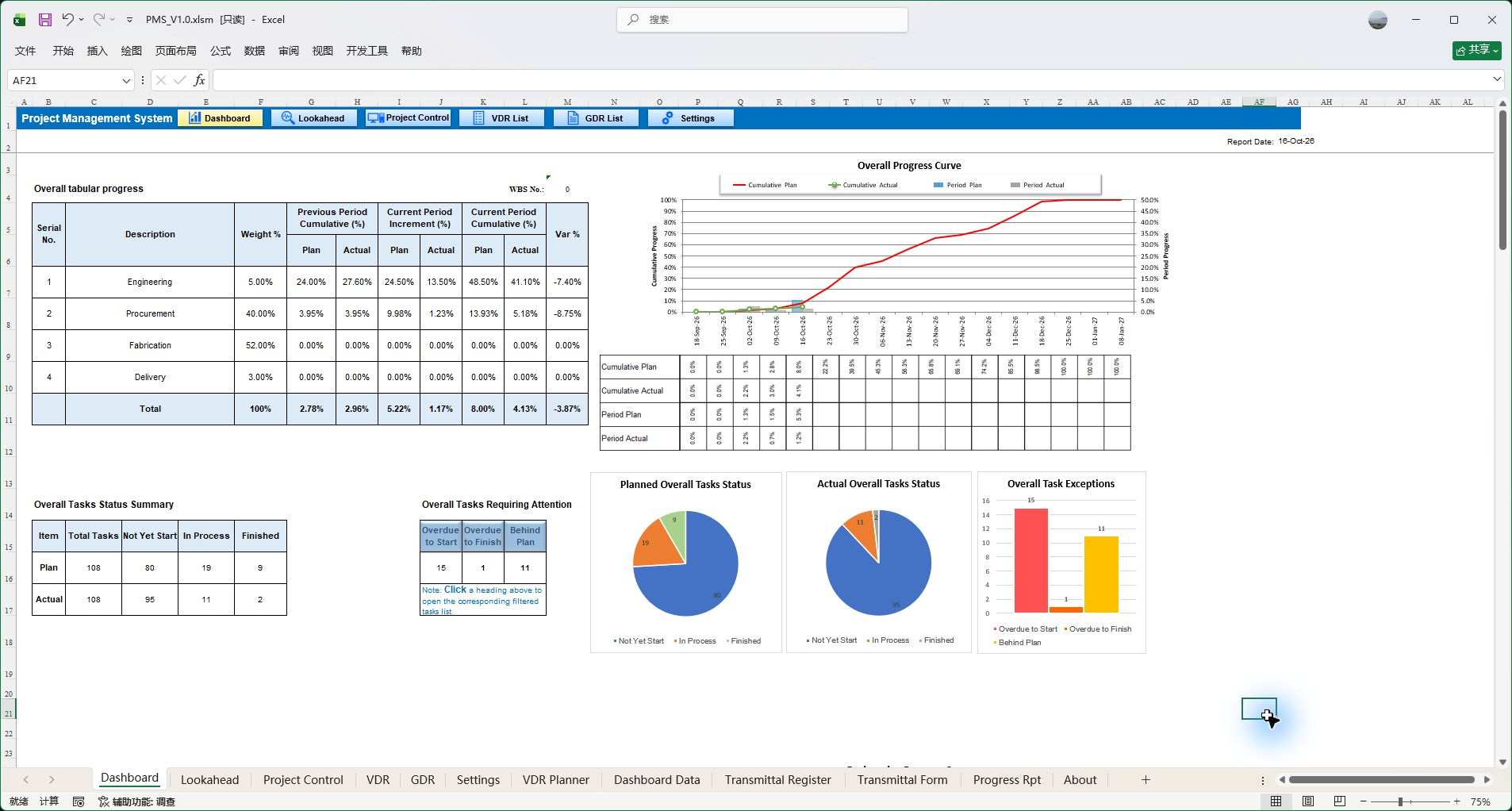
Dashboard
See planned and actual progress across engineering, procurement, fabrication and delivery, with items requiring attention.
Bring project planning, document management, execution tracking, progress control and management reporting into one workbook—from design through procurement and manufacturing. Spend less time moving and reconciling data, and see what needs to move next.
Unregistered template · Viewer mode · Windows Excel 2013 or later
See planned and actual progress across engineering, procurement, fabrication and delivery, with items requiring attention.
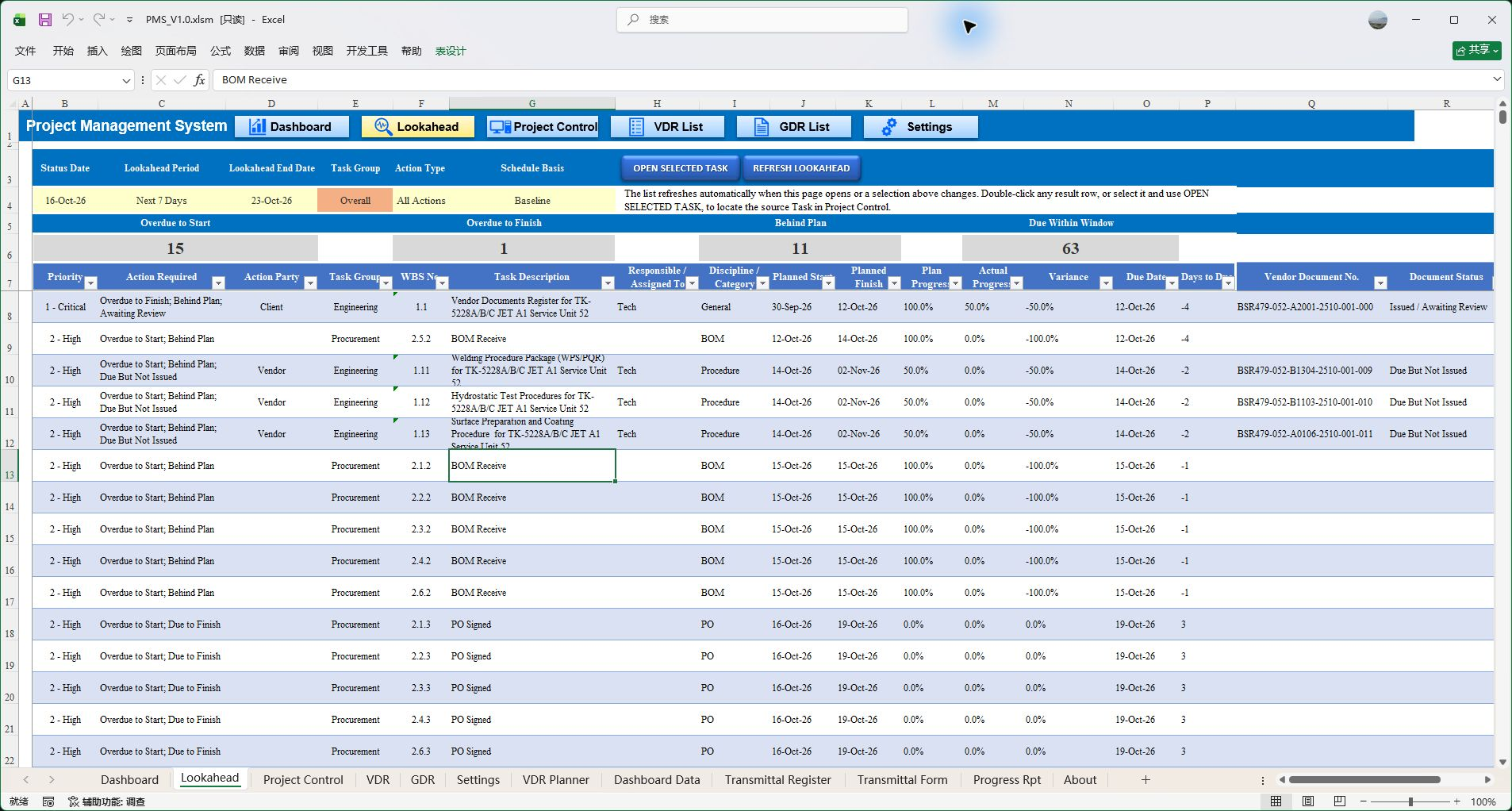
Find upcoming, overdue and delayed work within a time window, then focus the next action.
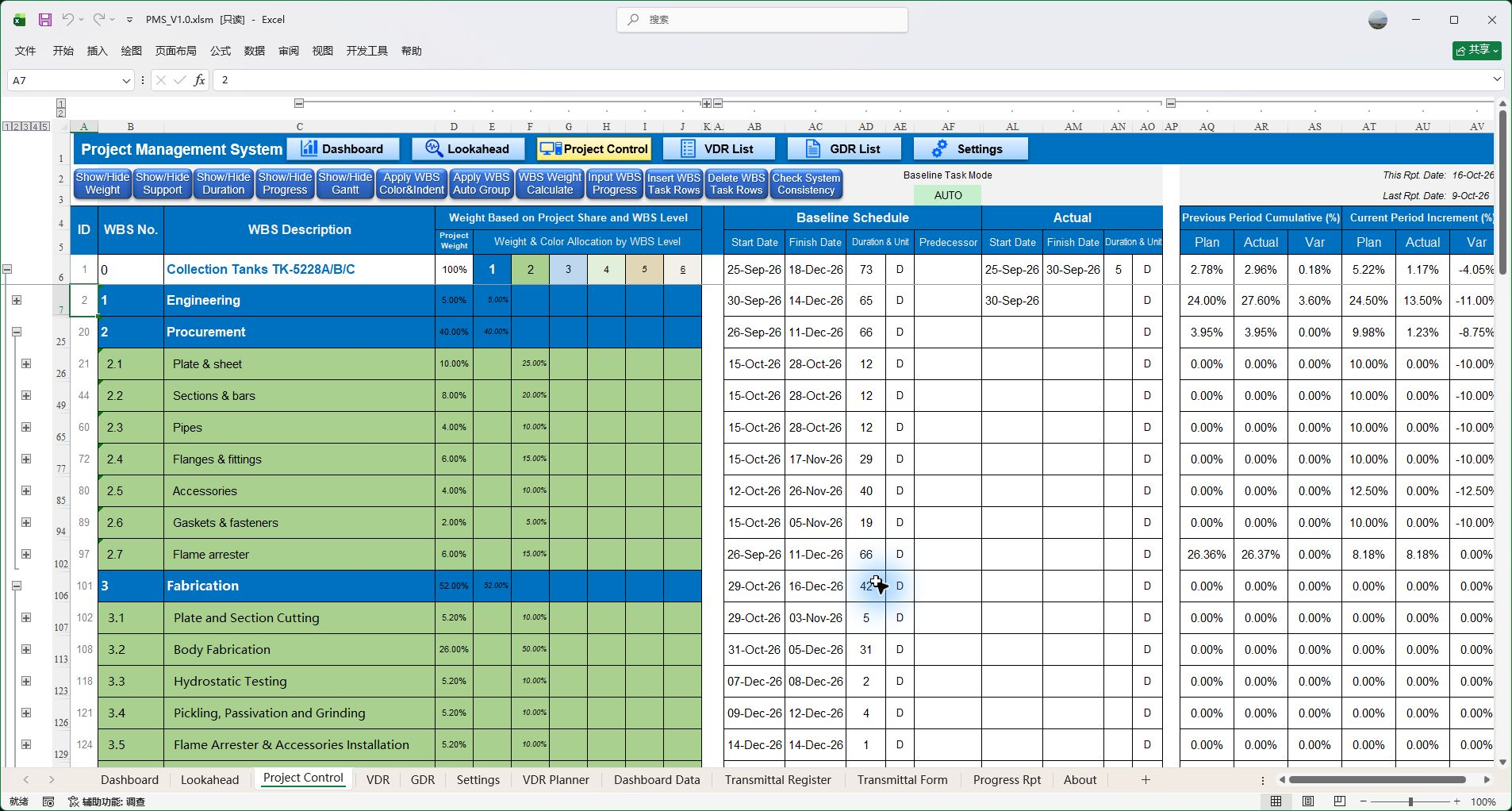
Organize project plans and actual execution through a WBS, task weights and predecessor relationships.
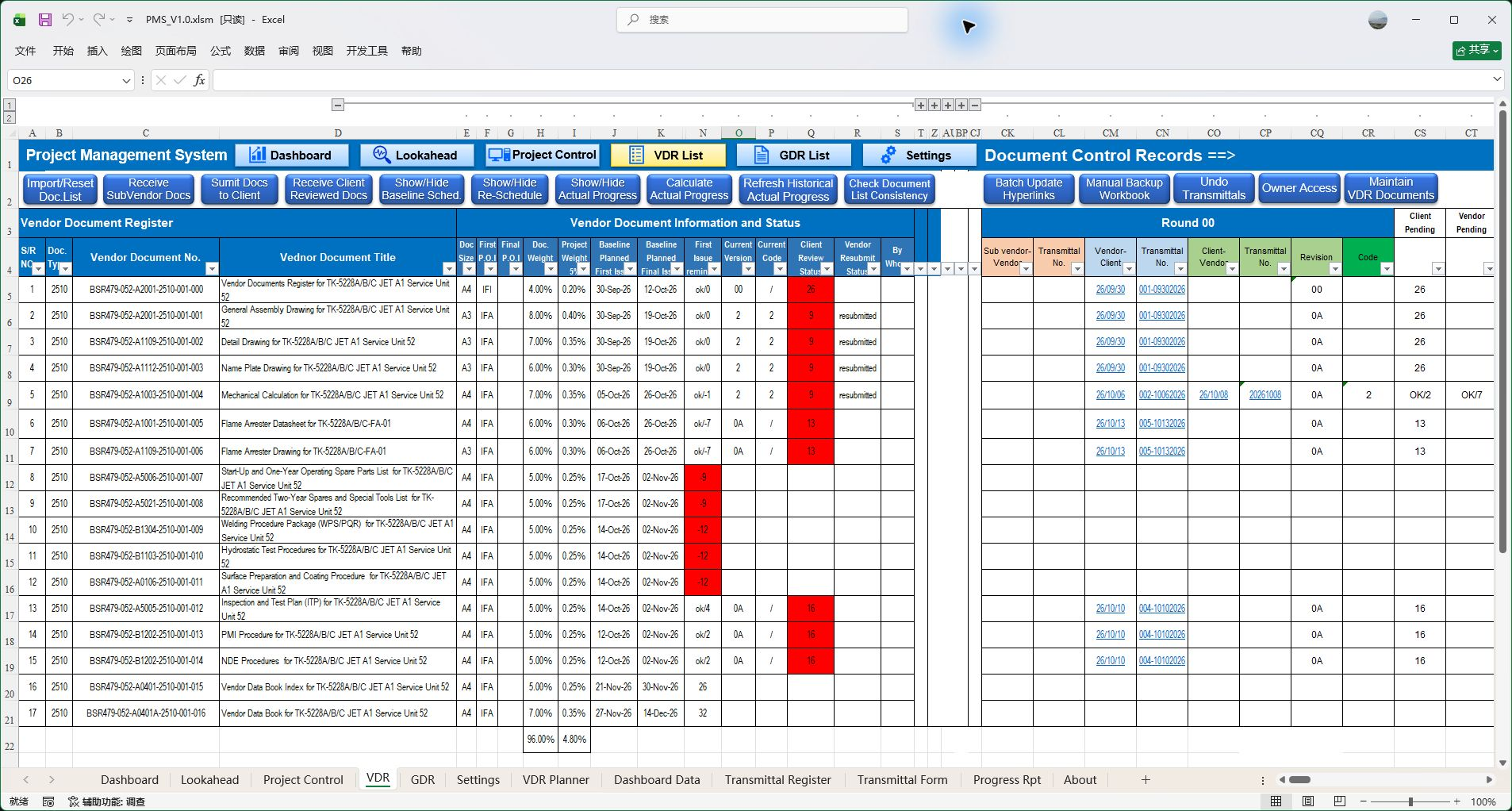
Connect engineering document revisions, issues, reviews and correspondence to the basis for progress control.
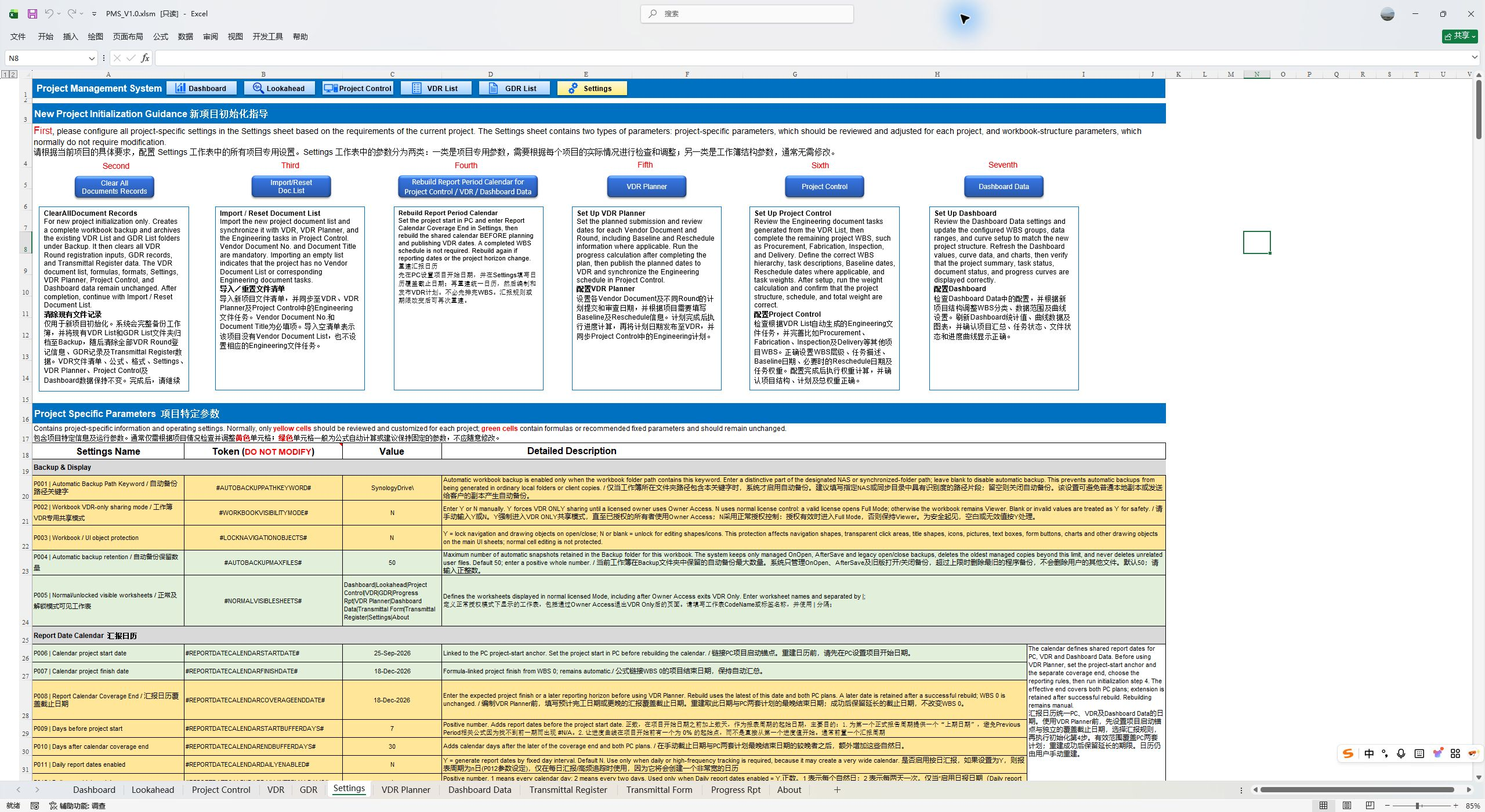
Start with project initialization guidance and core settings for consistent planning, document control and reporting.
Actual PMS V1.0 screenshots · Five core views of one connected project management framework.
Project managers need task dependencies, correspondence status, actual completion and a consistent reporting basis. PMS connects these through a shared WBS and related project data.
The WBS organizes project work. Document plans, execution records and progress data connect through their respective workflows to support project control and reporting.
Organize tasks through a WBS and predecessor relationships, with separate baseline and revised schedules. Engineering document milestones can also inform the scheduling of downstream procurement and manufacturing tasks.
Explore project planningTask actuals, document records, progress calculations, dashboards, lookahead and reports work together. Reduce repeated copying, assembly and reconciliation for separate reports.
Explore progress & historyIssues, reviews and resubmissions earn progress under project rules and roll up to the corresponding WBS. Document status connects to overall project performance.
Explore documents & progressConfigure document types, review Codes, progress credit, calendars, file recognition and reporting periods to reflect the requirements of the project.
Explore project configurationDashboard shows overall, discipline and category status. Lookahead focuses on upcoming, overdue and delayed work, with navigation to source records for follow-up and coordination.
Explore Dashboard & LookaheadExplore five linked stages. Users enter, publish, record and refresh data as required by the workflow; this is a process overview.
Build the WBS, task weights and predecessor relationships in Project Control for design, procurement and manufacturing. VDR Planner develops issue, review and resubmission milestones and publishes document plans one way to VDR and PC.
Read the operating instructionsProject tasks and document milestones share a planning framework.
Maintain actual dates and progress for ordinary procurement and manufacturing tasks. Use VDR for engineering issues, client reviews and sub-vendor documents, and GDR for clarifications, meeting records and other correspondence, with filing and transmittals.
Read the operating instructionsDifferent types of project work retain clear execution records.
Engineering documents earn progress under type, issue and review Code rules; ordinary tasks have maintained actual progress. Both roll up by WBS weights. Record current actuals at the report date and reconstruct history when corrections or late records require it.
Read the operating instructionsOverall progress has identifiable components, with distinct current and historical workflows.
Use Dashboard for overall, discipline and category performance and variances. Query Lookahead for upcoming, late-starting, overdue or delayed work within a time window, then navigate to the relevant task or document record.
Read the operating instructionsMove from project status to specific follow-up and coordination.
Organize Baseline, Re-schedule and Actual curves and period progress around the reporting date and schedule basis. Add management commentary and prepare reports on configured daily, weekly, biweekly or monthly periods.
Read the operating instructionsPlanning, execution, progress and reporting retain clear data relationships.
Engineering documents affect downstream procurement and manufacturing. PMS plans their issue and review milestones, then measures actual correspondence under project rules—connecting engineering document work with overall project control.
Maintain actual dates & cumulative progress
Procurement, manufacturing & other tasksMeasure issues, returns & review Codes
VDR execution recordsWBS hierarchy & weighted rollup → Project progress → Dashboard, curves & reports
Explore progress measurementWBS, dependencies, calendars and Gantt charts organize design, procurement and manufacturing tasks.
Maintain Baseline and Re-schedule separately and compare independent actual data against the selected schedule basis.
Compare plans and actuals, then use attention filters and Lookahead to locate specific tasks.
Execution records and task actuals roll up into curves and reports using the chosen report date, basis and period.
Sometimes the hardest part of a decision is gathering the information needed to make it.
A project manager in the petrochemical equipment industry started by reducing repetitive filing. Years of practical work gradually connected project planning, correspondence, progress control and management reporting. The tool grew around problems that needed solving.
Read how PMS beganEspecially suited to equipment supply, petrochemical equipment and engineering manufacturing projects. Projects without design documents can also use Project Control for procurement, manufacturing and other tasks.
Windows desktop Excel 2013 or later, with macros enabled as instructed. Keep cells, formulas and tables, while VBA handles repetitive scheduling, file processing, calculations and reporting. The workbook interface is English.
The unregistered template opens in Viewer. Browse project data, dashboards and supported viewing functions before purchasing full functionality.
Download the unregistered workbook to explore project data, dashboards and supported viewing functions in Viewer. Full functionality requires a valid device license.